Hooking Claude into Burp Suite with MCP
Hello folks, I wanted to share a simple but interesting task I’ve been exploring around automation in bug bounty or web app pen testing workflows. Like many of you, I often find myself doing repetitive & manual work especially when reviewing API logs, analyzing requests, scrolling through hundreds of API requests, and identifying patterns and flagging anything weird. So I started looking into ways to automate some of this “boring but necessary” work.
In this post I will walk through what MCP is, how it plugins with Burp Suite, how to wire the two together, and a small real example of letting Claude triage API traffic for me. A simple architecture is as follows
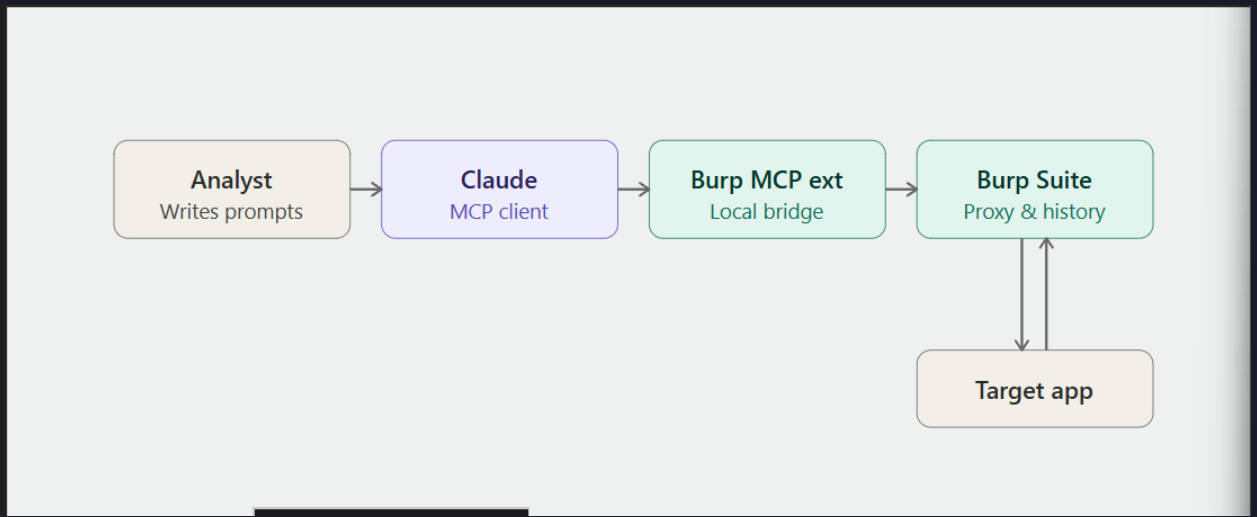
MCP Intro
MCP (Model Context Protocol) is an open protocol that lets AI assistants like Claude talk to external tools and data sources in a structured way. Instead of copy-pasting requests and responses into a chat window, MCP gives the model a direct, permissioned channel to do things query a database, read a file, or in our case, pull data straight out of Burp Suite. The best way to think of it is MCP is the USB port, Claude is the laptop, and Burp Suite is the device you're plugging in. Once they're connected, Claude can ask Burp questions ("show me all requests to /api/v2/users") and act on the results.
Setting it Up
I will keep it high-level so you can adapt it to your environment.
Fire up Burp Suite
Any edition with extension support works (Community is fine for playing around, Pro if you want the full feature set). In my cases I'm using burp suite pro
Install the Burp MCP server extension
There are a few community Burp MCP extensions floating around on GitHub. Grab one, load it into Burp via Extensions → Installed → Add, and make sure it's running. The extension exposes a local MCP endpoint that Claude can connect to.
⚠️ Heads up: only run MCP servers you trust, and keep the endpoint bound to localhost. You're giving an AI client access to your proxy traffic treat it like any other sensitive local service.
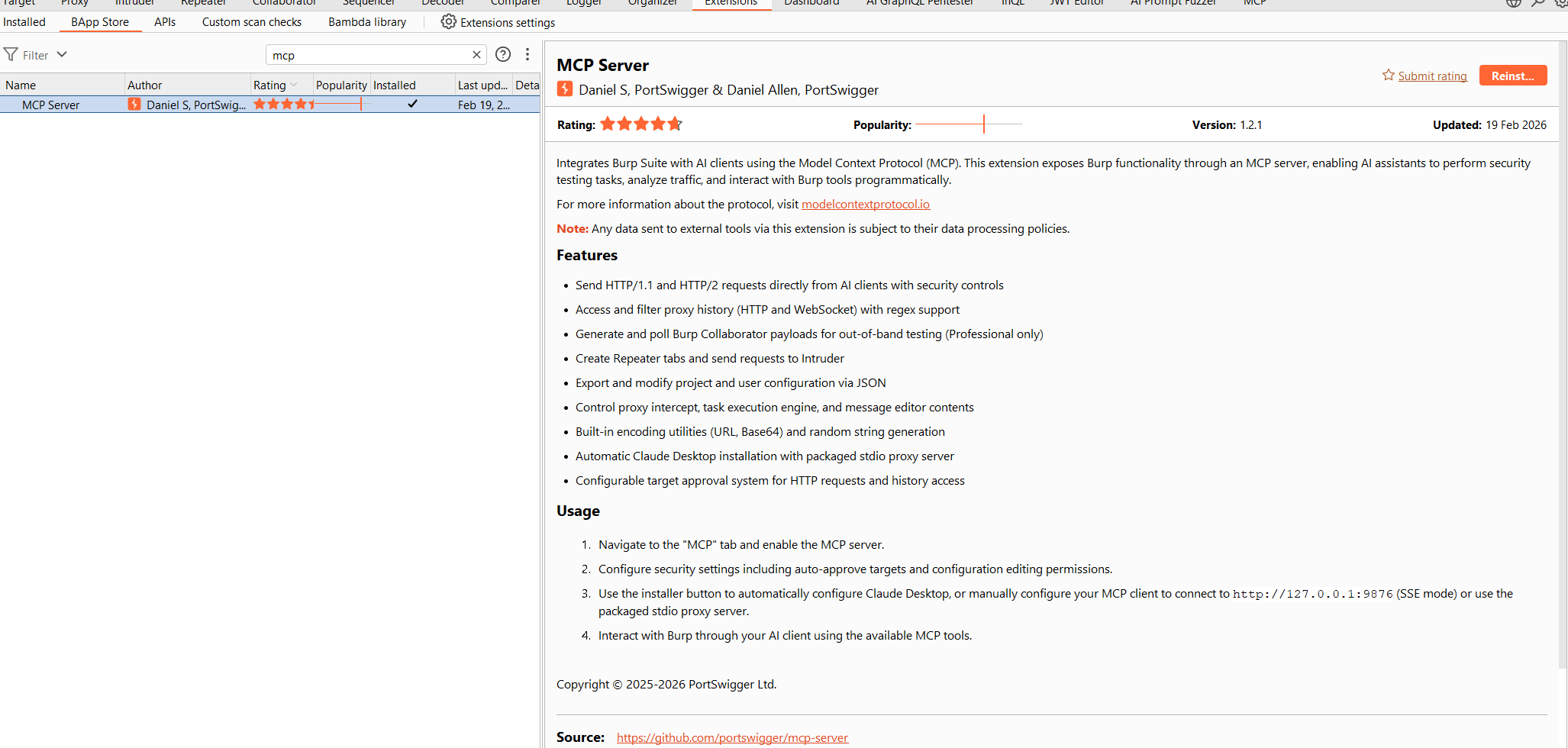
Connect Claude to the MCP server
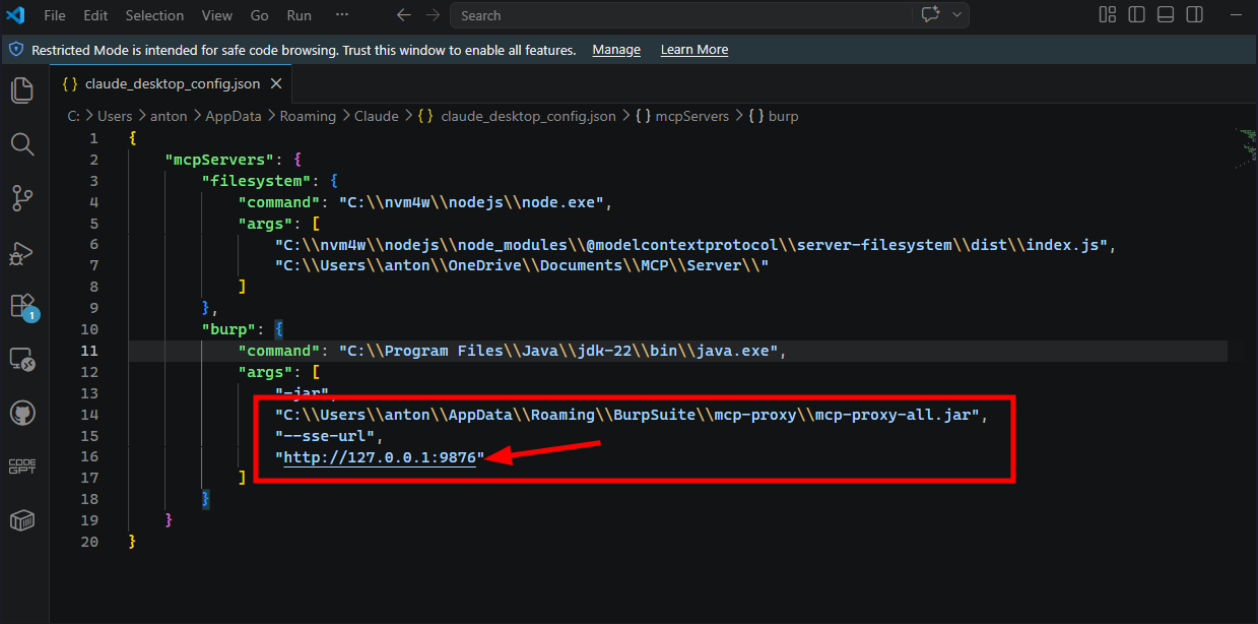
Once you have installed MCP configure the server configurations as listed below.
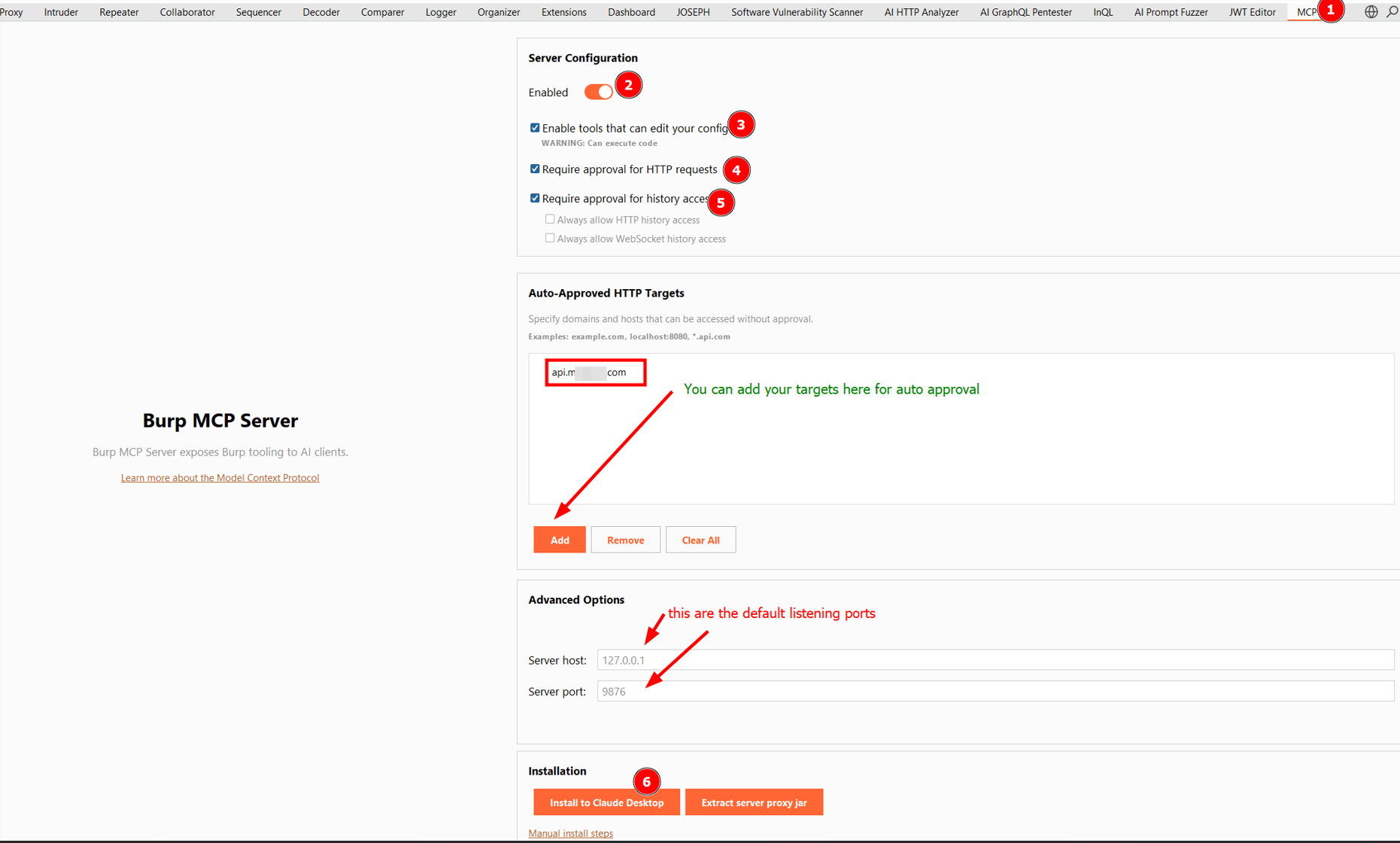
MCP Configurations
Let me walk through the numbered bits in the screenshot, because each of them matters. After installing the Burp MCP Server extension (BApp Store, or load the JAR manually via Extensions → Installed → Add), you will see a new MCP tab at the top of Burp alongside Proxy, Intruder, Repeater, etc. That's your control panel for everything Claude will be allowed to do.
- Enable the server- Flip the Enabled toggle on. This starts the local MCP server inside Burp nothing happens until you do this. If Claude can't see the Burp tools later, nine times out of ten it's because this toggle got switched off.
- Decide whether tools can edit your config: Enable tools that can edit your config note Burp's warning: "Can execute code." This lets Claude change Burp settings on your behalf (scope, scanner config, etc).
- Require approval for HTTP requests: Keep this checked. When Claude decides to fire off an HTTP request (e.g. via Repeater), Burp will pop up an approval prompt first so you can see exactly what's going out. It's a small speed bump that has saved me from at least one "wait, why is it hitting that" moment.
- Require approval for history access: Also keep this checked at least initially. Every time Claude reads from your HTTP or WebSocket history, you get a chance to approve it. Once you trust your workflow, the two Always allow... checkboxes underneath let you skip the prompt for history reads without opening up request execution. That's a nice middle ground.
- Auto-approved HTTP targets: In the Auto-Approved HTTP Targets section you can whitelist domains (e.g. api.target.com, or wildcards like .api.com) so Claude doesn't have to ask every single time when you're deep in a focused session on one scope.
- Advanced options: The server binds to 127.0.0.1:9876 by default. Leave it on localhost unless you have a very specific reason not to. Only change the port if something else is already using 9876.
- Install to Claude Desktop: Click install to claude desktop and the extension writes the correct MCP server config into Claude Desktop's config file . If you're using Claude Code or a different MCP client, there's also extract server proxy jar, which gives you the raw binary to wire up manually. The screenshot is sample of how to write the configs manually and sample of the config
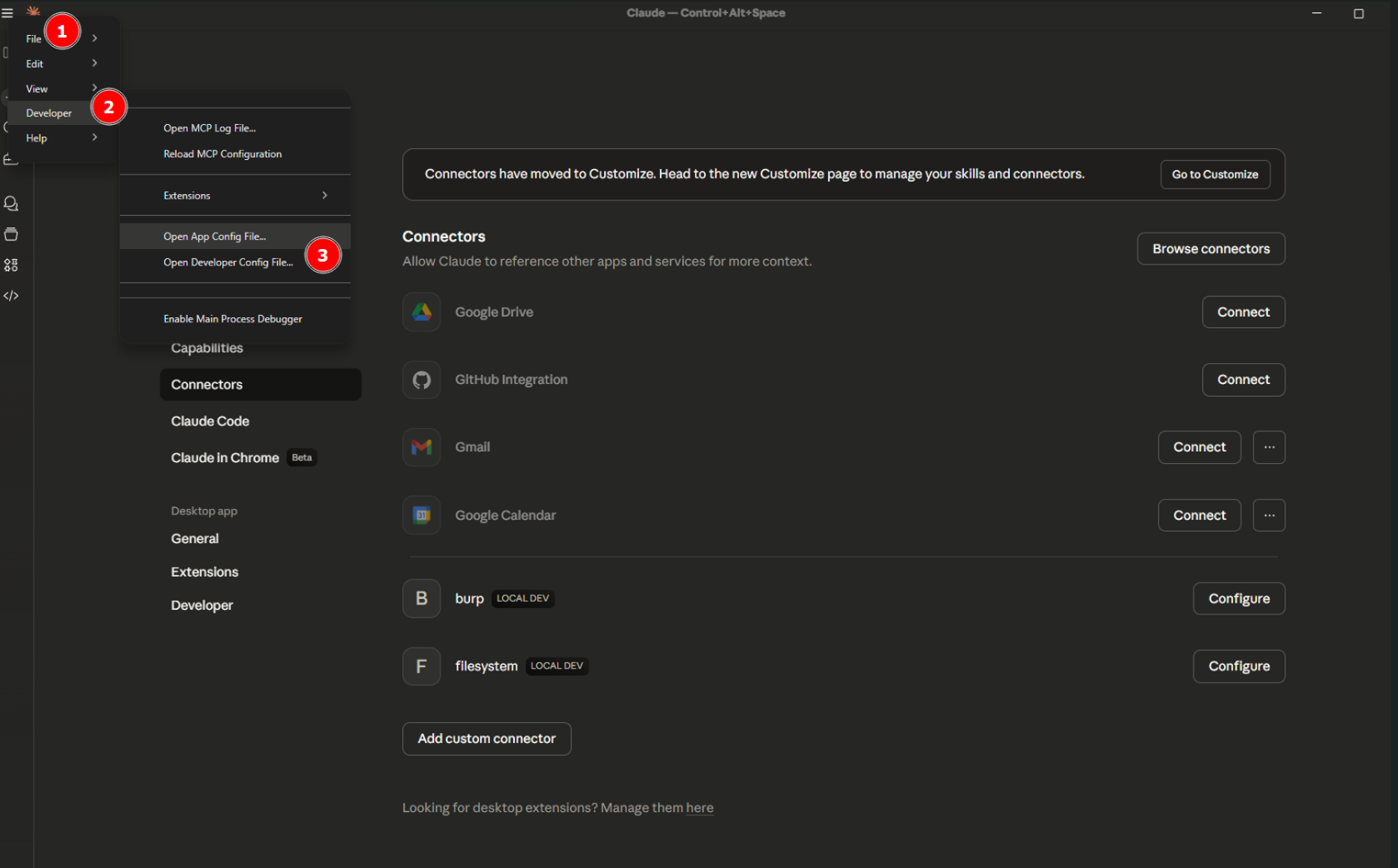
Sanity check
No that we have configured everythiing, lets start some basics Prompt for getting Started,
List the last 5 requests in Burp's HTTP history.

Pull the sitemap for host api.xxxx.com from Burp. Group endpoints by functional area (auth, user profile, admin, API, file upload, payments, etc.). For each group, list the endpoints, HTTP methods seen, and any parameters observed. Flag anything that looks high-value for testing: admin panels, file operations, ID-based lookups, password reset flows, API endpoints without obvious auth, and anything with debug, test, internal, or v1/v2 in the path
A Small Real Example: Triaging API Logs
For the project I was working on, this is the exact use case that inspired this post. After crawling a target, I had a few hundred requests sitting in Burp Suite history, and manually going through each of them was both time-consuming and inefficient.
What I really wanted to understand was:
- Which endpoints actually handle sensitive data?
- Are any of them returning more than they should?
- Are there obvious access control gaps same endpoint, different users, same response?
By leveraging MCP and integrating it with Claude, I was able to automate this analysis and quickly surface meaningful insights from the traffic as indicated below
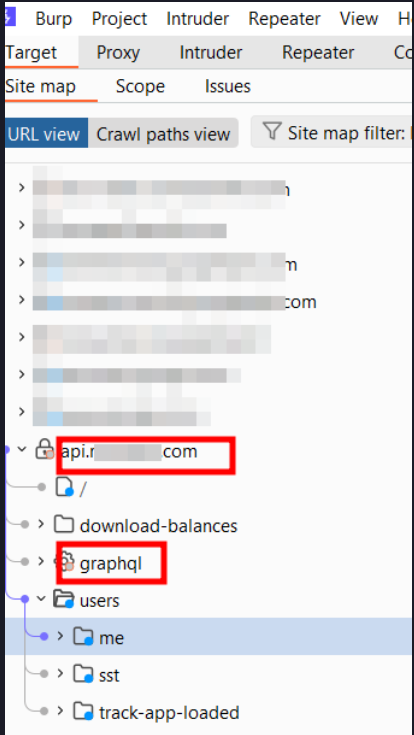
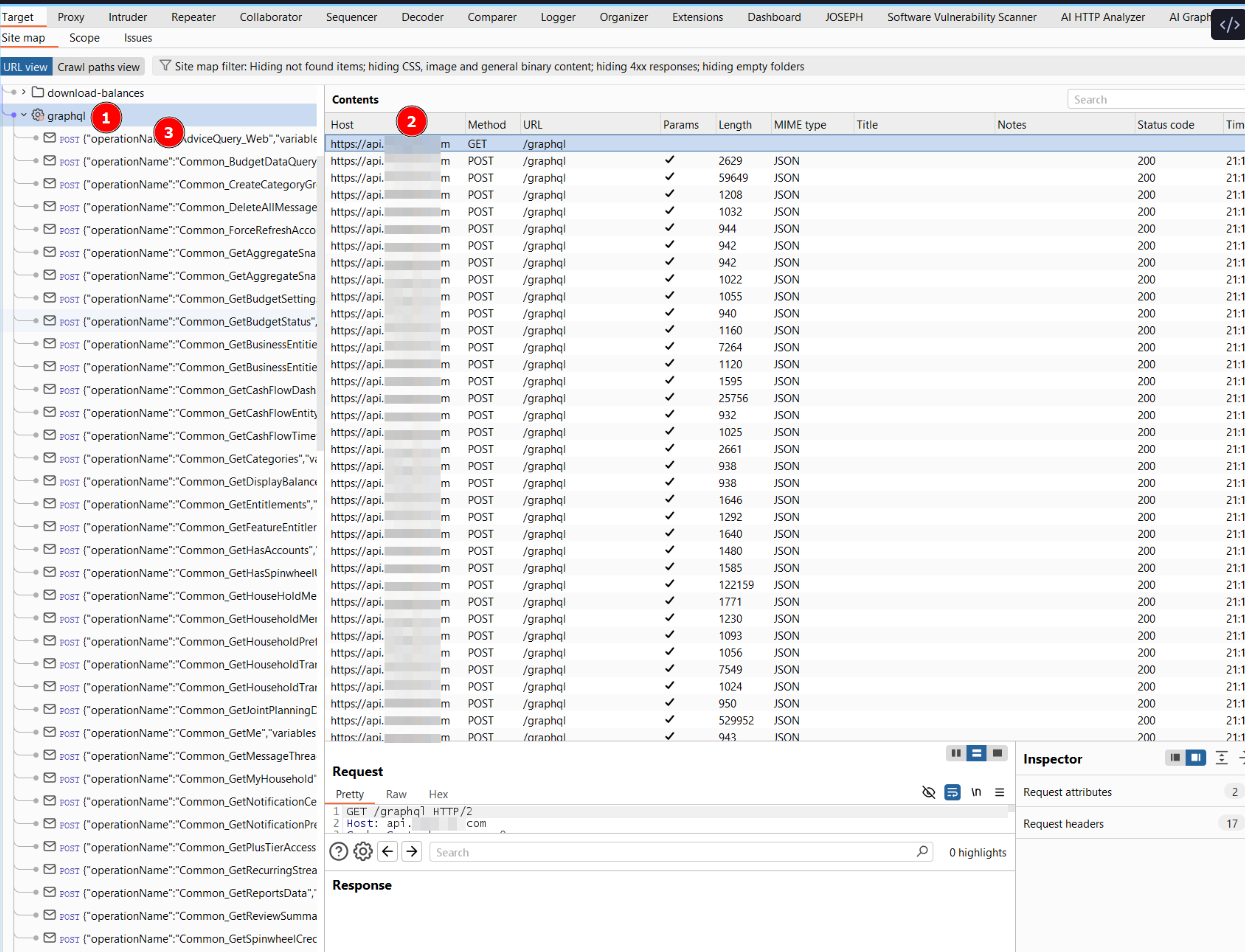
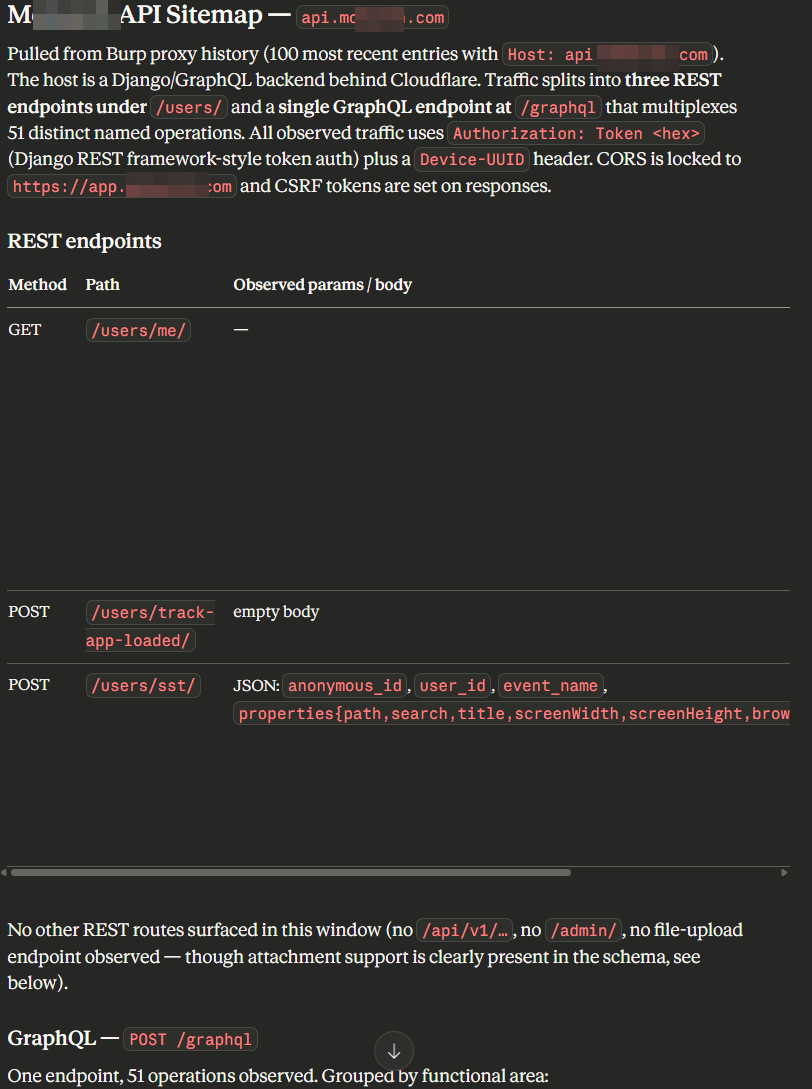 Based on the above observations, we can confirm this behavior directly from Burp Suite by reviewing the sitemap which allow us to validate the identified paths and operations.
 By analyzing these operations, you can distinguish between various application features and their intended roles, making it easier to prioritize testing and focus on areas that are more likely to introduce security weaknesses.
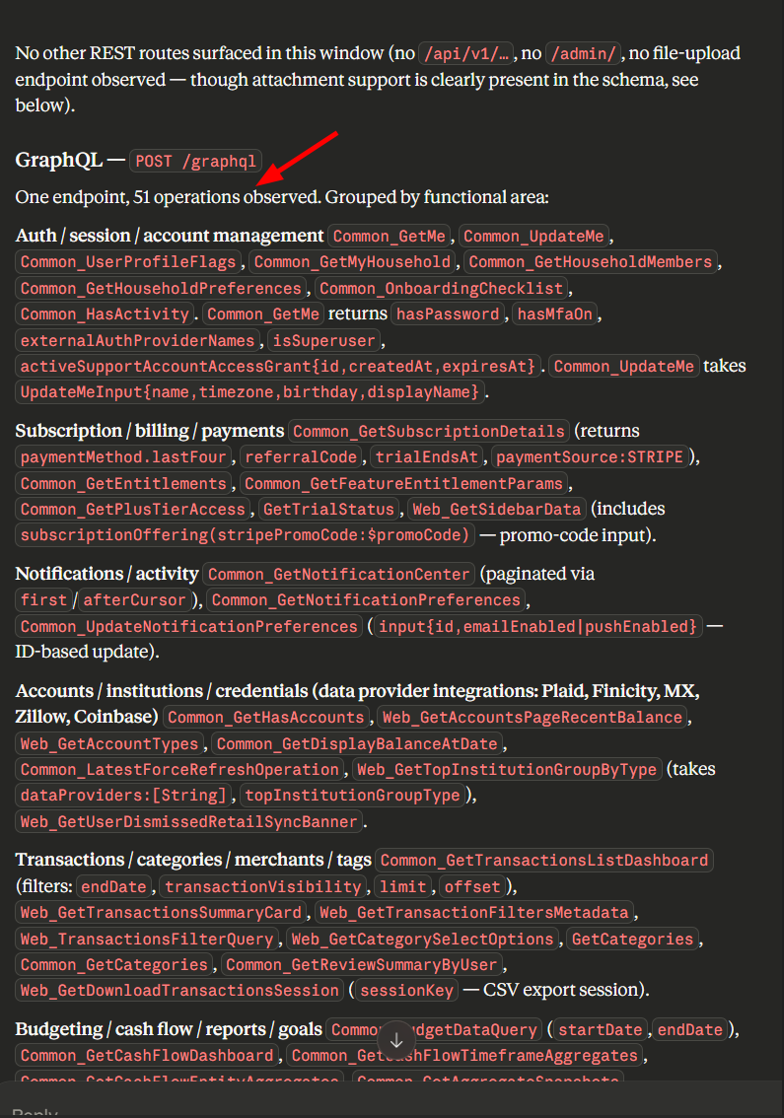 With the above we can see from the analyzed traffic it becomes much easier as a bug hunter to know where to begin instead of spending a lot of time manually trying to identify what each operation does. By leveraging MCP with AI, we can effectively gain visibility into how the application behaves, allowing you to quickly map functionality to specific endpoints.
From Logs to High-Value Targets
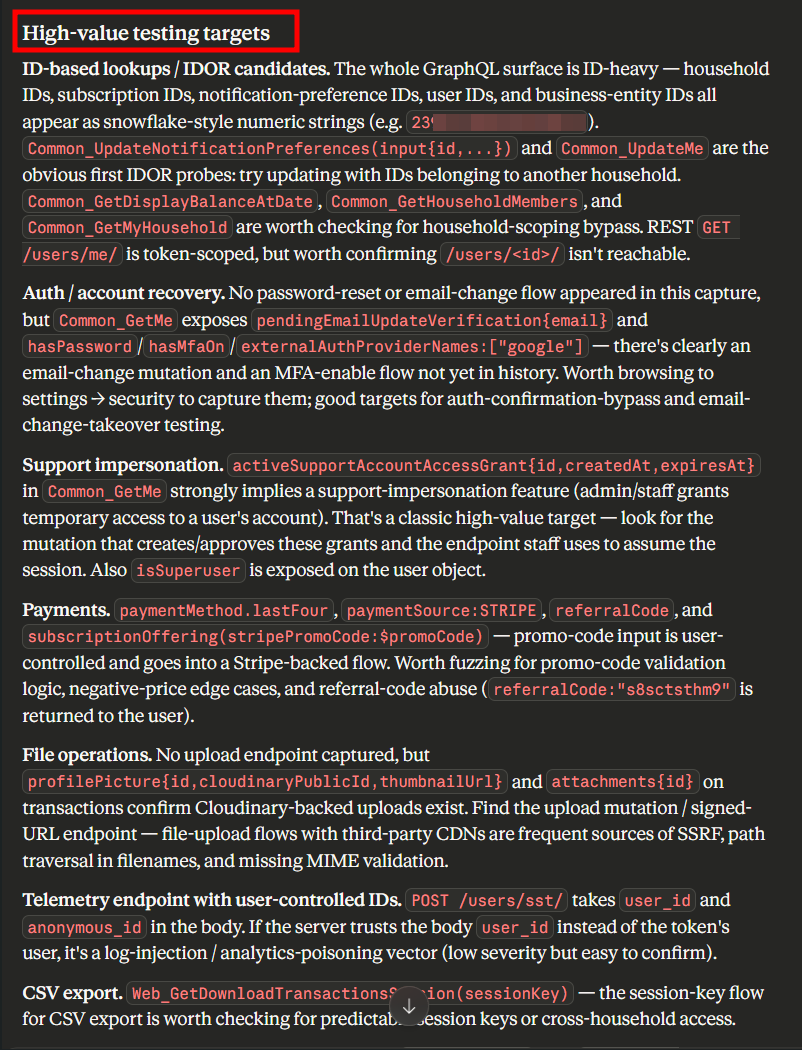
Once we’ve ingested and analyzed traffic through MCP, we can now move beyond just reviewing logs. We can identify high-value endpoints based on core application functionality, focus on endpoints that handle senstive operations such as authentication, payments, data access and privileged actions. With this we are able to reconstruct the entire API or GraphQL documentation from traffic alon and as a hunter its easier to understand what each endpoint does, reproduce functionality and map out attack surfaces more efficiently. As demonostrated and it actually worked.
Prompt 2 Sample of Prioritization & parameter inventory
From that sitemap, give me a prioritized testing checklist — top 15 endpoints ranked by likely impact, with the specific vulnerability classes I should test each one for and why.

List every unique parameter name seen across the sitemap, grouped by likely purpose (identifiers, redirects, file paths, SQL-ish, template-ish, command-ish). Flag parameters whose names suggest IDOR, SSRF, open redirect, LFI, SQLi, or SSTI candidates.
What to Watch Out For
A few honest caveats before you go wire this into a live engagement or sensitive environment :
- Scope and data sensitivity. Your Burp history contains client traffic. Understand where the AI requests are going and whether that's okay under your engagement rules before connecting anything.
- Hallucinations. Claude will sometimes confidently describe a vulnerability that isn't there. Always verify in Burp directly.
- It's a helper, not a replacement. Everything MCP + Claude does here is triage. The actual exploitation, impact analysis, and reporting is still on you.
Wrapping Up
MCP is one of those things that sounds abstract until you plug it into a tool you already use every day. Combining it with Burp turned what is usually grunt work into a conversation, and I'm finding more small wins the more I use it, generating wordlists from observed parameters, writing quick Python scripts to replay a set of requests, drafting writeups from session data. If you try this out, I'd love to hear what prompts work well for you. And if you've built (or found) a solid Burp MCP extension, drop the link — the ecosystem is still pretty young and worth sharing. Happy hunting
References
https://portswigger.net/bappstore/9952290f04ed4f628e624d0aa9dccebc
https://infosecwriteups.com/dast-automation-using-burpsuite-mcp-923b6c0101e1